Getting an SSS number is one of the most important steps for workers, first-time job seekers, self-employed individuals, OFWs, and voluntary members in the Philippines.
If you are searching for a clear guide on how to get sss number here in the Philippines, this article will explain the process in a simple and beginner-friendly way.
Many people get confused because SSS registration now involves online application, email verification, document upload, and My.SSS account activation.
In this guide, you will learn the requirements, step-by-step online process, what to print or download, how to avoid duplicate registration, and what to do after getting your SSS number.
An SSS number is your lifetime member number with the Social Security System.
You will use it for employment, contribution records, benefits, loans, and other SSS transactions.
According to SSS, a person should only have one SS number for life. SSS also warns that getting more than one SS number may cause delays in future benefit or loan processing.
This is why you should not apply again if you already had an SSS number before.
Who Needs an SSS Number Philippines?
You may need an SSS number if you are:
A first-time employee applying for work.
A self-employed person who wants to pay contributions.
A voluntary member.
An OFW who wants to continue or start SSS coverage.
A non-working spouse who wants SSS membership.
SSS says prospective employees, self-employed members, non-working spouses, and OFWs can apply for an SS number online. Mandatory online registration has been enforced since July 15, 2020 for faster and more convenient membership application.
SSS Number Philippines Requirements
Before starting your application, prepare your personal information and documents.
The most important document is your birth certificate.
SSS Form E-1 states that new registrants must submit a birth certificate, or acceptable supporting documents if a birth certificate is not available. It also reminds applicants to present original or certified true copies when submitting photocopies of required documents.
Your name, birthdate, and personal details must match your official documents.
Small spelling mistakes can cause problems later.
Important Reminder Before Applying for SSS Number Philippines
Before you apply, check first if you already have an SSS number.
This is very important.
Some people already have an SSS number from a previous job application, school requirement, or earlier registration.
SSS says verification of a previously issued SS number can be requested at the nearest SSS office. It also says members should never secure another SS number.
If you are unsure, verify first before applying again.
How to Get SSS Number Philippines Online
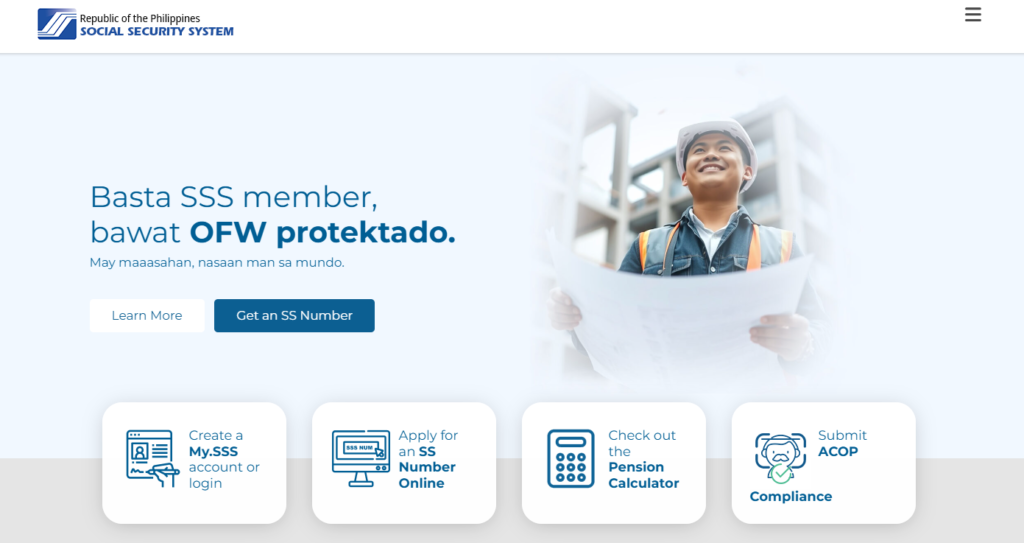
The SSS online process starts on the official SSS website.
SSS says first-time applicants may apply for an SS number through the SSS website or through an SSS branch E-Center.
Look for the option to apply for an SS number online.
SSS lists “Get an SS Number” as part of its Become an SSS Member page.
Avoid random websites that ask for sensitive personal information.
Always use the official SSS website.
Step 2: Start the SS Number Application
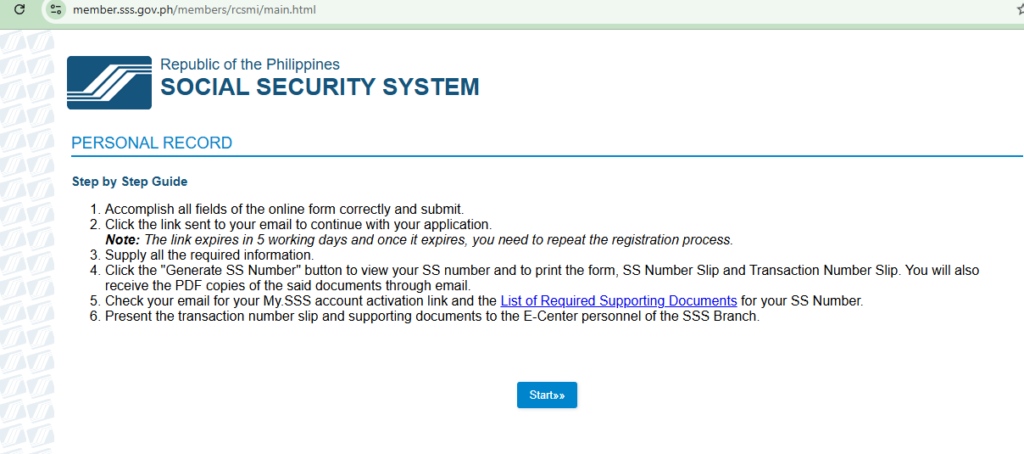
Read the procedures carefully.
Click “Start” when you are ready.
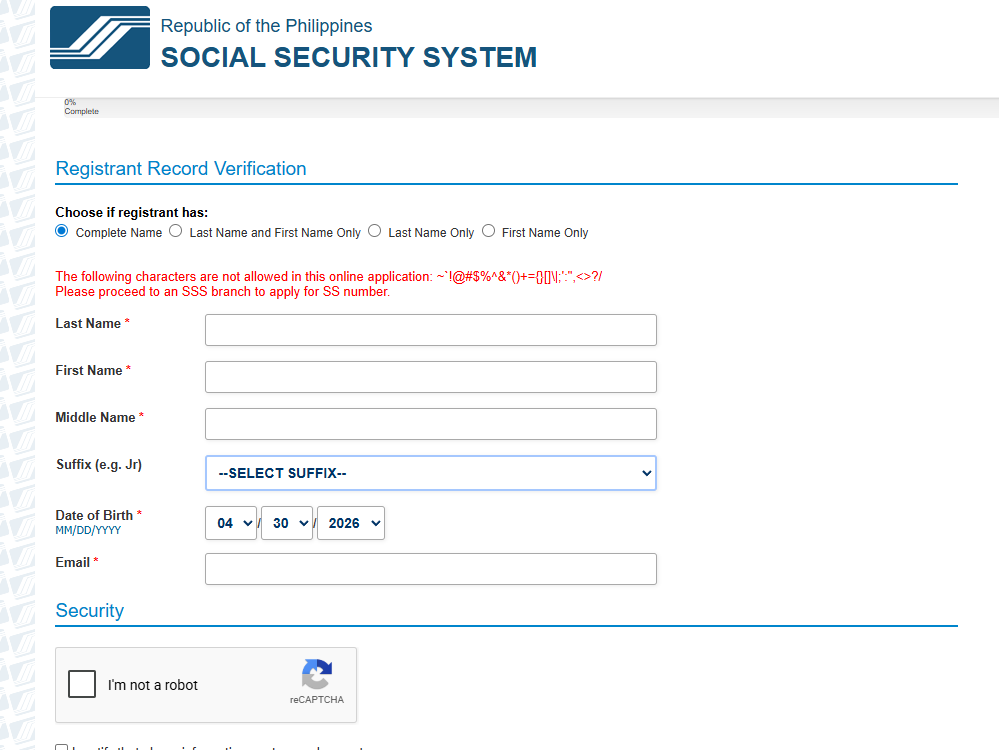
You will be asked to provide initial information for registration verification.
Make sure all details are accurate before submitting.
Step 3: Fill Out the Registrant Record Verification
Complete the required fields.
This usually includes personal details such as name, birthdate, and other identity information.
After filling out the form, confirm the security check and certify that your information is true and correct.
SSS specifically instructs applicants to accomplish all required fields, tick the security confirmation, certify the information, and submit.
Step 4: Check Your Email
After submitting, check your email.
SSS will send a link that allows you to continue your SS number application.
This link is important.
SSS says the email link is valid for five calendar days only. If it expires, you need to submit a new online application.
Also check your spam or junk folder if you do not see the email.
Step 5: Complete Your Personal Information
Click the link from your email.
Continue filling out the application.
You will need to provide:
Basic information.
Contact information.
Home address.
Purpose of registration.
Social status.
Place of birth.
Beneficiary details.
SSS says applicants must supply basic and contact information, home address, purpose of registration, social status, place of birth, and beneficiary details during the online application.
Step 6: Choose Your My.SSS User ID
During the process, you will be asked to provide your preferred My.SSS User ID.
You may also need to enter details such as height and weight for the Personal Record Application.
Your My.SSS account will be useful for checking contributions, generating payment reference numbers, and doing online transactions later.
SSS has a separate My.SSS registration page where members can create an account and transact online.
Step 7: Review Your Information Carefully
Before generating your SS number, review everything.
Check your:
Name.
Birthdate.
Address.
Civil status.
Beneficiaries.
Contact details.
SSS says once the SS number is generated, wrong information will need to be corrected at an SSS branch.
Take your time on this step.
Step 8: Generate Your SS Number
After reviewing your details, click “Generate SS Number.”
The system should display your generated SS number.
You may also receive confirmation through email.
Save your SS number immediately.
You will need it for employment and future SSS transactions.
Step 9: Upload Supporting Documents
After generating your SS number, you may be asked to upload supporting documents.
SSS allows applicants to upload a readable colored JPEG or PDF file of the selected supporting document, with a maximum file size of 3MB.
Make sure the file is clear.
Blurry or unreadable documents can cause delays.
Step 10: Download and Print Your Documents
After completing the process, download or print the documents generated by the system.
SSS says the system displays the generated SS number and gives the option to print or download the Personal Record or E-1/E-6 form, SS Transaction Number Slip, and SS Number Slip. The same confirmation is also sent through email.
Keep both digital and printed copies.
You may need these when submitting documents or when your employer asks for proof.
Step 11: Activate Your My.SSS Account
Check your email for the My.SSS web registration activation link.
Click the link and nominate your password.
SSS says the link for creating a My.SSS account is valid for 30 calendar days. If it expires, you need to register in My.SSS using the transaction number shown in your E-1 as your registration preference.
Do this as soon as possible.
Your My.SSS account will be useful for future online transactions.
Step 12: Submit Documents if Needed
Your SS number may still need document confirmation depending on your application status.
SSS explains that an SS number tagged as “Temporary” can be used for contribution purposes only. To become eligible for benefits or loans, the member must have an SS number tagged as “Permanent.”
To change status, you may need to submit or present your PSA-issued birth certificate or other accepted primary documents.
SSS lists primary documents such as UMID, Philippine Identification Card, driver’s license, NBI clearance, passport, postal ID, and voter’s ID, among others.
What to Do After Getting Your SSS Number Philippines
After getting your SSS number, do not stop there.
Make sure you:
Save your SS number.
Activate your My.SSS account.
Submit documents if needed.
Inform your employer if you are applying for work.
Keep your email and mobile number updated.
Your SSS number is only the start.
Your account becomes more useful once contributions are posted and your records are correct.
Check your email quickly because the application link expires.
Review all details before generating your SS number.
Submit documents if your account needs to become permanent.
FAQs
Can I get an SSS number online?
Yes. SSS allows first-time applicants to apply for an SS number through the SSS website.
Is my SSS number lifetime?
Yes. SSS states that the assigned SS number is a lifetime number and must be used in all SSS transactions.
Can I apply for another SSS number if I forgot mine?
No. You should not apply for another number. SSS says you may request verification of a previously issued SS number at the nearest SSS office.
What if my email link expires?
SSS says the SS number application email link is valid for five calendar days only. If it expires, you need to submit a new online application.
Do I need to submit documents after online registration?
You may need to submit or upload supporting documents, especially if your number needs to be tagged properly for full eligibility. SSS says a temporary SS number can be used for contribution purposes only, while benefits or loans require a permanent status.
Conclusion
Getting an SSS number in the Philippines is easier now because the application can be started online.
The most important thing is to use the official SSS website, enter correct information, check your email, and save all generated documents.
If you already had an SSS number before, do not apply again.
Verify it with SSS instead.
Once you get your number, activate your My.SSS account and complete your records so you can use SSS services properly in the future.
Join Discussion
Have questions about your SSS application or online registration?









Comments
Comments are closed.